GPU Data Path: Why Your GPU Is Starving
October 18, 2026
When I started reading GPU telemetry in my lab, the counters told me what the GPU was doing — but not what it actually is. I could tell you my workload was compute-bound, but I couldn’t have pointed to an SM on a die or explained why the HBM stacks sit where they do.
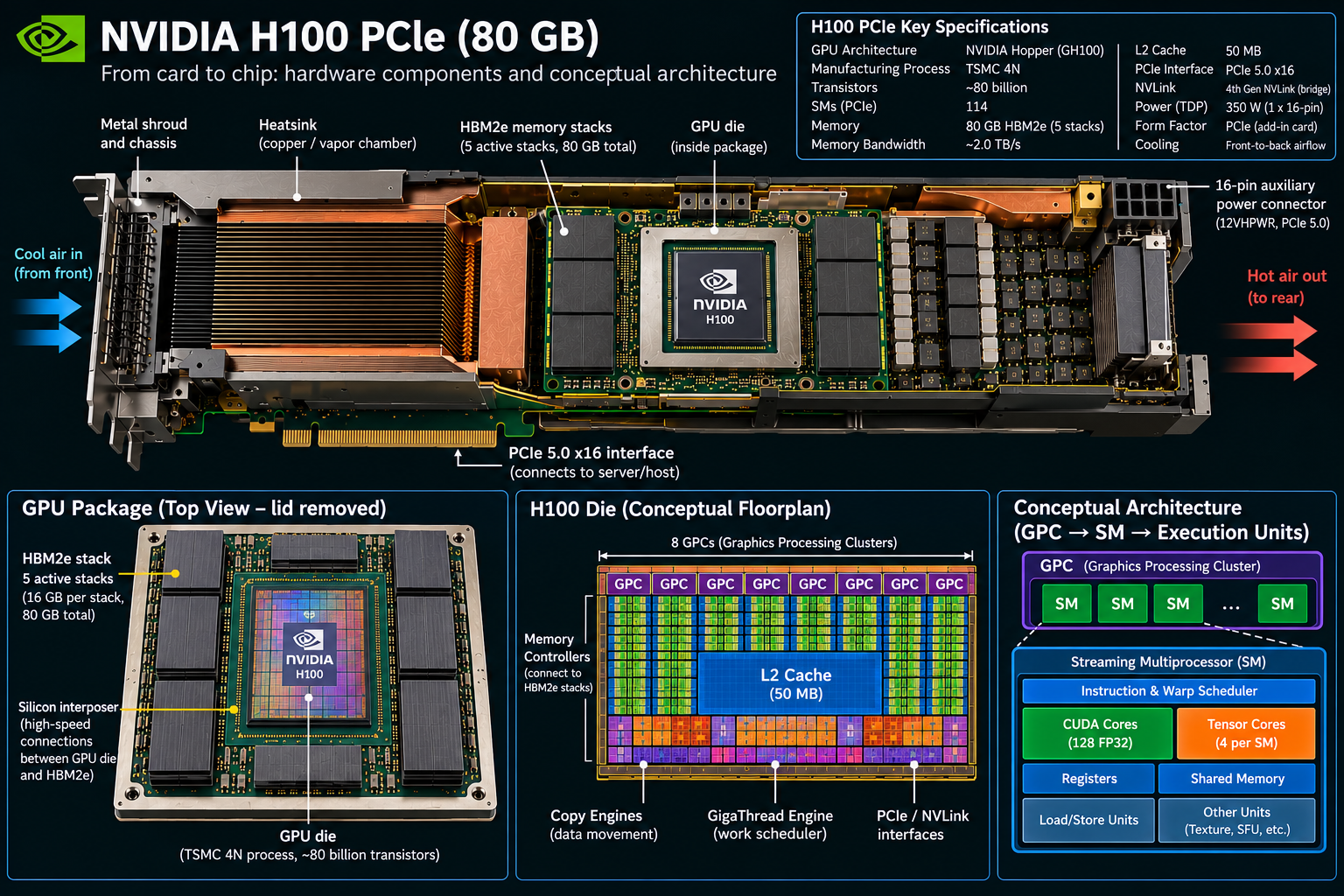
So I took the H100 PCIe 80 GB as a reference and pulled it apart on paper: the physical accelerator card, the GPU package, and the conceptual die architecture. Three levels, each one explaining the level above it.
The GPU Is Only Part of the Data Path
The H100’s specifications tell us what the hardware can do. The more important question for infrastructure engineering is what happens to the data before it reaches the GPU.
Follow a training batch through the system and every specification becomes part of a chain, as shown below:
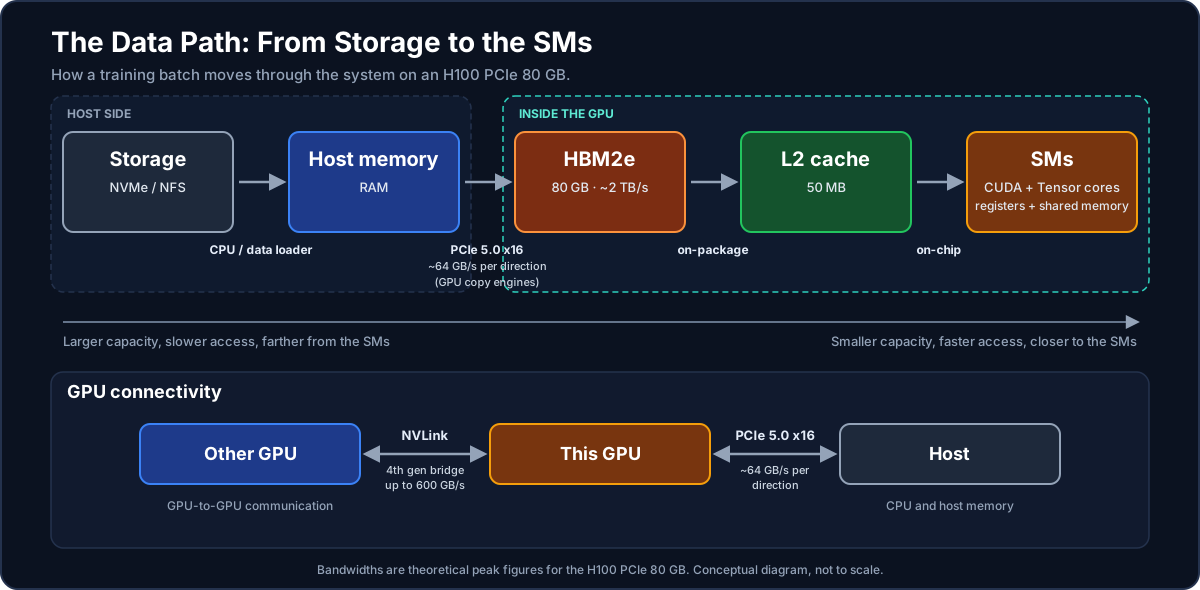
Performance depends on how efficiently data moves through that chain.
Storage → Host Memory
The dataset typically starts in NVMe storage or network-attached storage. The CPU and data-loading pipeline pull batches into host memory before they are transferred to the GPU.
Host memory is large compared with GPU memory, but its bandwidth and latency characteristics are very different from HBM. Storage is usually slower still.
This is where the first part of the pipeline lives: Storage → CPU → Host Memory
If the data pipeline cannot prepare batches fast enough, the GPU can be left waiting even when the GPU itself has substantial compute capacity available.
Host → GPU over PCIe
Once a batch is ready, the GPU’s copy engines can move data from host memory across the PCIe 5.0 x16 interface into HBM.
For PCIe 5.0 x16, the theoretical bandwidth is roughly 64 GB/s in each direction, or approximately 128 GB/s aggregate bidirectional bandwidth. That distinction matters.
The GPU may have roughly 2 TB/s of HBM2e bandwidth, but host-to-GPU traffic is constrained by the much narrower PCIe link. That’s one reason data placement matters. If the workload repeatedly moves data across PCIe instead of keeping it resident on the GPU, the GPU’s compute engines can end up waiting for data.
I’ve seen this pattern in my own lab: when SM utilization drops and the GPU counters don’t immediately explain why, I start walking the data path upstream rather than assuming the GPU is the problem.
HBM2e → L2 → SM
Once the data reaches the GPU, the hierarchy changes dramatically. The H100 PCIe provides 80 GB of HBM2e with approximately 2 TB/s of memory bandwidth. The die and the memory stacks are joined by a silicon interposer — the physical link carrying that bandwidth between compute and memory.
Data moves through the GPU memory hierarchy toward the SMs. The 50 MB L2 cache provides an intermediate layer between HBM and the compute resources. An L2 hit can avoid going back to HBM, reducing memory traffic and latency.
This is where access patterns start to matter. A workload that repeatedly accesses data already resident in cache behaves very differently from one that continually streams data from HBM.
Inside the SM
The SM is where the data finally becomes computation. The H100 PCIe exposes 114 Streaming Multiprocessors, grouped into GPCs (Graphics Processing Clusters) — each SM an independent execution engine pulling from the same memory hierarchy.
Within the SM are the execution and storage resources that feed the workload: Registers → Shared Memory → CUDA Cores / Tensor Cores
Registers provide extremely fast per-thread storage. Shared memory provides fast programmer-managed data sharing between threads in a block. CUDA Cores handle general-purpose GPU computation, while Tensor Cores are specialized for matrix and AI-oriented operations.
One thing worth unlearning: CUDA Cores and Tensor Cores aren’t separate regions of the die. They’re execution resources inside the SM — closer to how a CPU core holds both integer and vector units than to a motherboard with a CPU here and a GPU there.
The hierarchy is deliberate: Smaller → faster → closer to execution
As you move outward: Registers → Shared Memory → L2 → HBM → Host Memory → Storage
capacity increases, while access generally becomes slower and more expensive.
The Return Path
The data path doesn’t end when computation finishes. Results can move back: SM → L2 → HBM → PCIe → Host
Or, in a distributed GPU workload: GPU → NVLink → GPU
And eventually: GPU → Network → GPU on another node
This is where a single-GPU architecture becomes a distributed AI infrastructure problem. The bottleneck may no longer be the GPU. It might be:
- PCIe
- NVLink
- network bandwidth
- network latency
- collective communication
- CPU data preparation
- storage throughput
- synchronization
The GPU Is a Data-Movement Problem Too
Every layer of the hierarchy has different: Capacity → Bandwidth → Latency → Cost
The closer data is to the SM, the faster it can generally be accessed — but the available capacity becomes smaller.
That’s why data placement is performance.
When a GPU looks idle, don’t immediately assume the GPU is underperforming. Walk the data path backward: SM → HBM → PCIe → Host → Storage
The counters can tell you that the GPU is starving. The architecture tells you where to look next.
Why This Matters for AI Infrastructure
A GPU is only one component of an AI platform. Real workload performance depends on the interaction between: Compute → Memory → Interconnect → Network → Storage → Orchestration
A workload can be limited by GPU compute, HBM bandwidth, PCIe transfers, GPU-to-GPU communication, networking, storage, thermal limits, power limits, or software scheduling.
That is why GPU infrastructure requires a systems-level view.
The goal isn’t simply to install GPUs. The goal is to build a system where the CPU, GPU, memory, network, storage, firmware, operating system, containers, Kubernetes, observability, and workload all work together without creating unintended bottlenecks.
From Hardware to Production
The H100 provides the compute foundation. Production AI infrastructure builds the rest of the system around it.
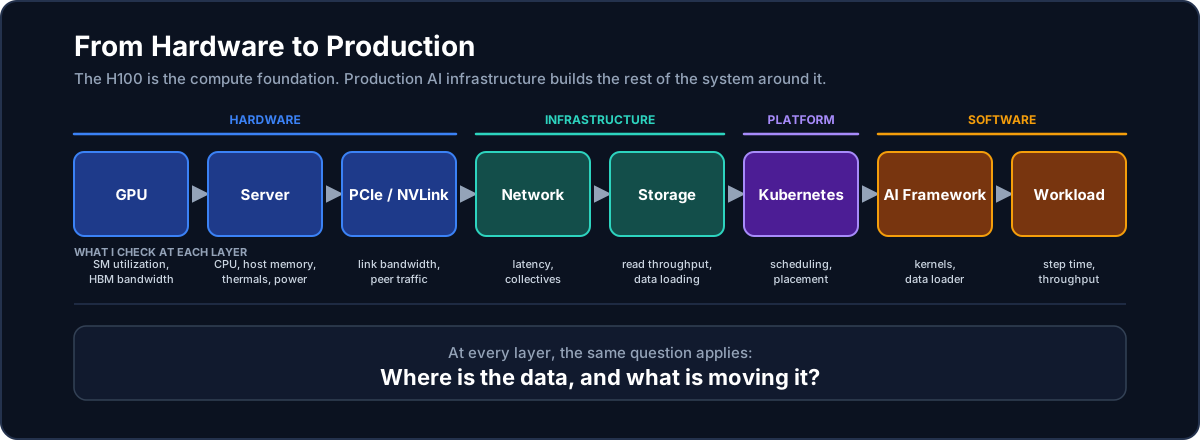
At every layer, the same question applies: Where is the data, and what is moving it?
That question connects GPU architecture to infrastructure engineering. It is also where observability becomes important. Metrics tell us what the system is doing; understanding the architecture tells us why.
See also
- GPU Architecture — what’s inside the H100: GPCs, streaming multiprocessors, HBM, and the memory hierarchy that decides performance